Home | Forums | Mark forums read | Search | FAQ | Login

Advanced search
Hot Topics
Buraku hot topic Tourette's, Miyazaki-style
Buraku hot topic Nigerians to be banned in Tokyo's Shinjuku Ward
Coligny hot topic Hong Kong Tourists in Fatal Hokkaido Car Crash
Buraku hot topic K-Pop Songwriter Racist Rant: World Better Without Black People, Whitney No Big Loss
Coligny hot topic Looking for the Japanese Elon Musk
Buraku hot topic Japanese jazz pianist beaten up on NYC subway
Buraku hot topic There'll be fewer cows getting off that Qantas flight
Coligny hot topic Where The Hell Did Everyone Go?
Buraku hot topic 'Paris Syndrome' strikes Japanese
Buraku hot topic Ocean's Seven Samurai
Change font size
  • fuckedgaijin ‹ General ‹ Tokyo Tech

Graphic Help.

News, shopping tips and discussion of all things tech: electronics, gadgets, cell phones, digital cameras, cars, bikes, rockets, robots, toilets, HDTV, DV, DVD, but NO P2P.
Post a reply
4 posts • Page 1 of 1

Graphic Help.

Postby NeoNecroNomiCron » Fri Mar 26, 2004 11:23 am

I am still in the process of creating a photo blog kindo of thing. But there is a graphic adjustment I would like to use. I have checked many packages and even tryed to make my own mask/layer that will produce the same result. It is often used in games and some sites. A bit like heavy interlacing. With blur warmth and glow added. anyway here is an example, not the best but close.

Image

I have also notice it can be used as a direct 3d option but I am not into heavy 3d coding. Any Ideas?

Am I still not allowed to have a sig?
User avatar
NeoNecroNomiCron
Maezumo
 
Posts: 1668
Joined: Tue Jul 15, 2003 11:30 am
Location: Slacking
Top

Re: Graphic Help.

Postby mr. sparkle » Fri Mar 26, 2004 11:47 am

NeoNecroNomiCron wrote:I am still in the process of creating a photo blog kindo of thing. But there is a graphic adjustment I would like to use. A bit like heavy interlacing. With blur warmth and glow added. anyway here is an example, not the best but close.

You can do this very easily with the pattern generation tools in Adobe Photoshop. Here's a link which describes the process. Is that what you wanted?

As far as the blur and glow.

Duplicate the image layer. Apply 2 pixels blur to the image on the overlying layer. Use a transfer mode to give it a glow look.

Cheers and good luck.
Mr. Sparkle
Member - FG Iliterati

"I am interested in the relationship of the lower part of the human body and the lower part of the social structure on which the reality of daily Japanese life obstinately supports itself."

- Shohei Imamura
User avatar
mr. sparkle
Maezumo
 
Posts: 1274
Joined: Sun Sep 22, 2002 3:21 am
  • Website
Top

Re: Graphic Help.

Postby Taro Toporific » Fri Mar 26, 2004 12:04 pm

NeoNecroNomiCron wrote:.. there is a graphic adjustment I would like to use. ....A bit like heavy interlacing. With blur warmth and glow added....Any Ideas?
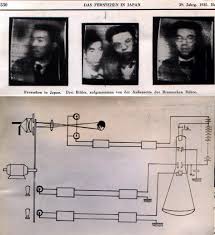

Why not take webcan shots of your Japanese TV circa 1935?
Image

Actually, yesterday I was looking for a PhotoShop filter for vignetting, "with blur warmth and glow added" to create faux LOMO photographs.

The PhotoShop processes I used were:
:arrow: vignetting,
+
:arrow: Filter, Stylize, Glowing edges
+
:arrow: Filter, Smart blur

Now for your photos...
For the Lines running across the whole photo like aTV circa 1935 I would take a picture of lines I've drawn and paste it over the base photo as layer using Filter, Emboss with 20% opacity.
_________
FUCK THE 2020 OLYMPICS!
User avatar
Taro Toporific
 
Posts: 10021532
Images: 0
Joined: Tue Sep 10, 2002 2:02 pm
Top

Re: Graphic Help.

Postby NeoNecroNomiCron » Fri Mar 26, 2004 12:36 pm

Thanks mr sparkle and taro exactly the area I was looking for. When ever I type into google what i want i just get a load of ads' Its a pitty hotbot(my olf fave seatrch engine) changed maybe 3 years ago lol.


"with blur warmth and glow added" to create faux LOMO photographs.

Ha ha you are caught, you know you could always of bought the lomo at the party. He he. cheap.

But actualy I have been trying to do this myself. Through the ISO standard and appature on my camera and also thourgh editing. Its very hard to get it just right. If i do manage I will send you the layer/instructions. But it is very very hard to reproduce. THe best thing i have come up with is never use a flash , long exposure. and your the white balance on something with a light green colour. as green is the channel that adjusts the contrast and is the one that produced the brightness. so over exposing with green not as strong brings out the other colours like the lomo.
Am I still not allowed to have a sig?
User avatar
NeoNecroNomiCron
Maezumo
 
Posts: 1668
Joined: Tue Jul 15, 2003 11:30 am
Location: Slacking
Top


Post a reply
4 posts • Page 1 of 1

Return to Tokyo Tech

Who is online

Users browsing this forum: No registered users and 1 guest

  • Board index
  • The team • Delete all board cookies • All times are UTC + 9 hours
Powered by phpBB® Forum Software © phpBB Group